Windows desktop app · v1.0.0 · Now available

Your files,
where they belong.

Filegami watches your Downloads folder and silently routes every file to the right project folder — automatically, instantly, without interrupting your flow.
Download for Windows See it in action →
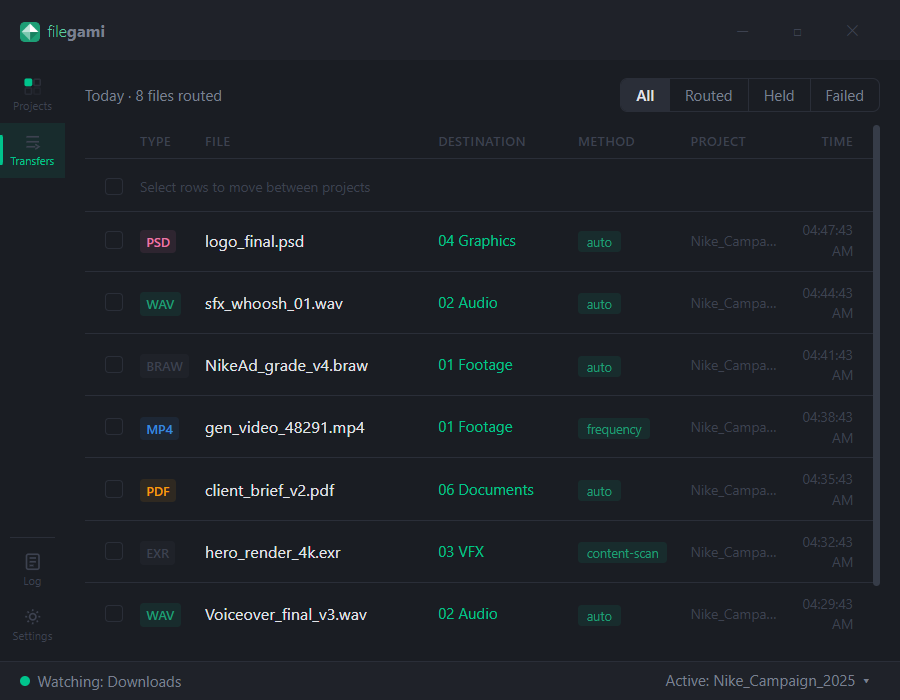
Filegami — Transfers
Filegami Transfers tab showing 8 routed files

Built for workflows powered by

Runway Kling AI Midjourney ElevenLabs Sora Adobe Premiere DaVinci Resolve After Effects Blackmagic RED Camera ARRI WeTransfer Dropbox Frame.io

Everything you need.
Nothing you don't.

Built for post-production professionals who manage multiple projects with high file volumes and external drives.

👁

Always watching

Sits quietly in your system tray monitoring Downloads in real time. Zero friction, zero thought required.

🧠

Learns your habits

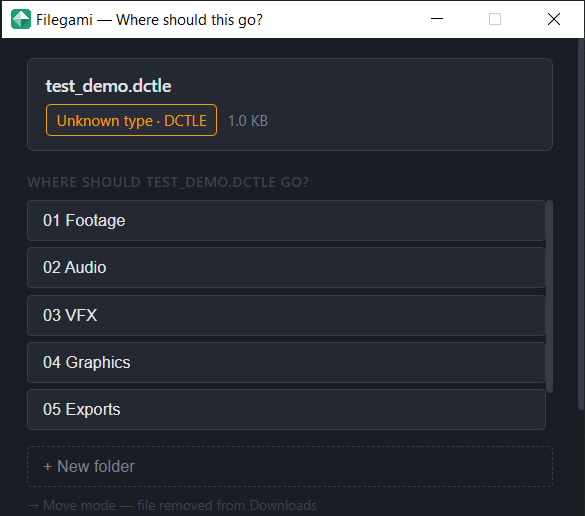
One answer teaches the whole category. Tell it where video goes once — every .mov, .mp4, .braw routes silently forever.

📁

Works from minute one

Pick a project folder. Filegami reads your existing structure and starts routing immediately. No setup. No rules to write.

💾

Drive-aware

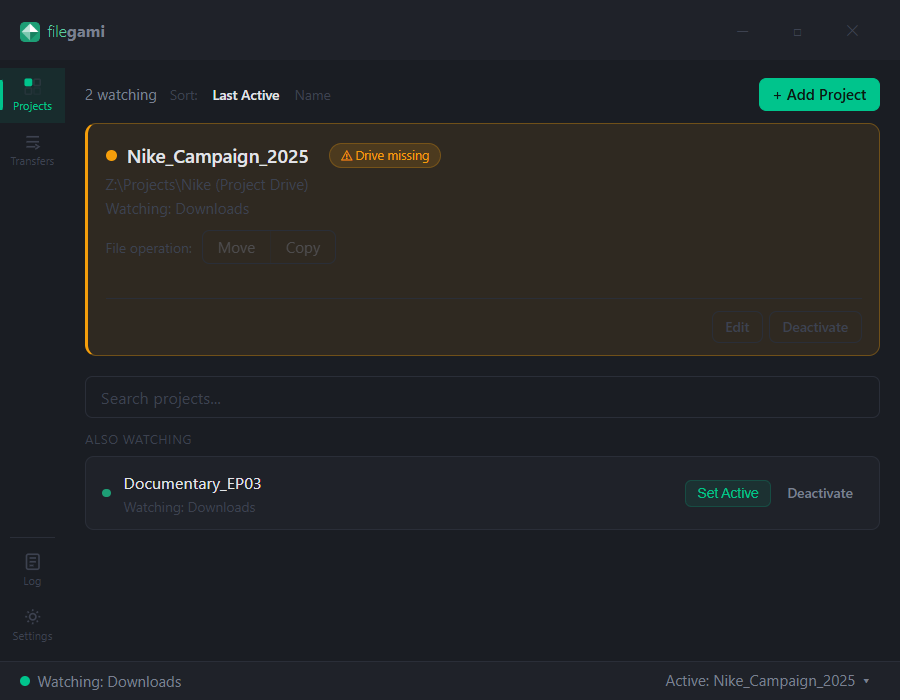
External drive missing? Files are held safely in a queue — never lost, never routed to the wrong place. Reconnect and they route automatically.

🗂

Multi-project

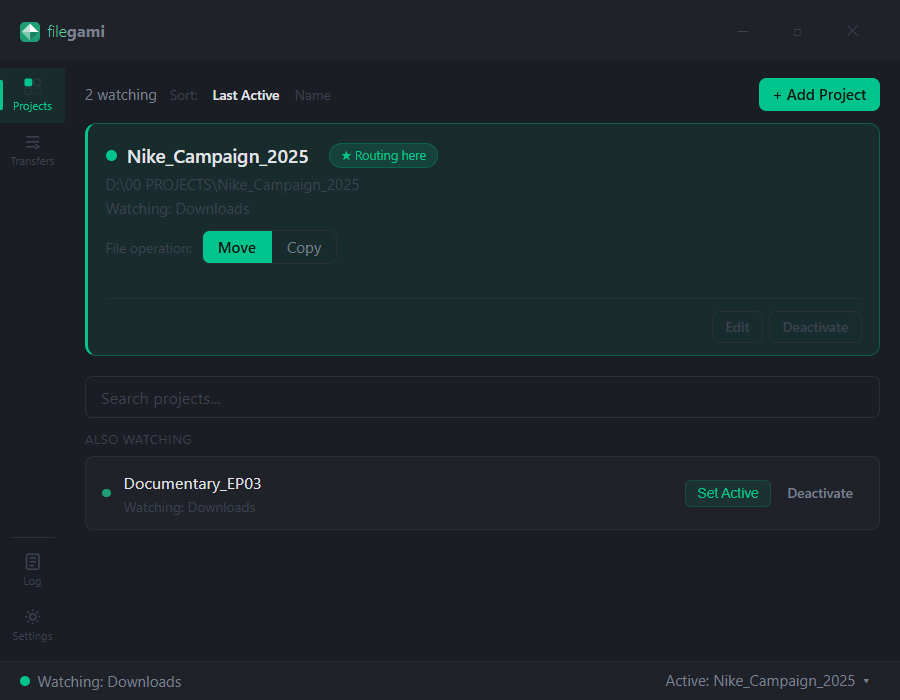
Switch the active project from your tray menu in one click. Every file goes exactly where you expect, every time.

🔒

100% local

All processing happens on your machine. No cloud, no account required, no data leaves your computer. Ever.

Built for real workflows.

Every decision visible. Every route logged. Full control without any extra work.

Transfers tab showing routed files
Transfers tab
Every routed file logged with type, destination, method, and project. Nothing happens silently without you knowing.
Projects tab
Projects tab
Switch active project instantly. Every file routes to wherever you're working right now.
Drive missing state
Drive-aware routing
External drive disconnected? Clear warning, files held safely, automatic retry when reconnected.

Set up once.
Forget forever.

From install to first file routed in under 60 seconds.

01

Install and select your project

Point Filegami at your project folder. It reads your existing subfolder structure and builds an instant routing map — no manual rules.

02

Download files as normal

Work exactly as you do today. Filegami watches silently in the background — no workflow change required from you.

03

Files appear where they belong

Each file is classified, routed, and moved automatically. A toast notification confirms exactly where it went.

04

Gets smarter over time

Every decision trains the learning engine. Answer once per category, and every future file of that type routes silently forever.

Routing prompt dialog

The more you use it,
the less it interrupts you.

Filegami builds a picture of how you work. Quietly. In the background. Without you having to think about it.

Day 1
Already working
Reads your existing folder structure. Routes files immediately. No setup required.
Week 1
Mostly silent
Learned your categories. Files route without asking. Prompts become rare.
Always
Completely invisible
Works across every project. Never forgets. Gets better with every session.
Supports 200+ file formats
From .mp4 and .wav to .braw, .r3d, .ari, .exr, .dpx and every professional camera and audio format. If it lands in Downloads, Filegami handles it.

Common questions.

What file formats does Filegami support?
200+ formats including professional camera formats (.braw, .r3d, .ari, .mxf), video (.mp4, .mov, .mkv, .avi), audio (.wav, .aiff, .mp3, .flac), image (.png, .jpg, .psd, .exr, .dpx), and documents (.pdf, .docx, .xlsx). Unknown formats trigger a one-time prompt — you pick the folder once and it never asks again.
Does it work with external drives?
Yes. Filegami identifies drives by serial number, not drive letter — so it works correctly even when your drive mounts at a different letter. If a drive is disconnected, files are held safely and routed automatically when the drive reconnects.
Do I need to write any rules?
No. Filegami reads your existing folder structure and starts routing immediately. On the first file of each type it doesn't recognise, it asks once. After that, it routes silently forever. Most users never touch a settings screen.
Is my data safe? Does it send anything to the cloud?
All processing is 100% local. No account required, no data leaves your machine, no internet connection needed after install. Your files, your machine, your rules.
How much does Filegami cost?
Filegami v1.0 is completely free. Unlimited projects, full intelligence engine, no account required, no subscription ever. Download and use it forever.
Does it work with Dropbox, WeTransfer, or AI tools like Runway and Kling?
Yes. Any file that lands in your Downloads folder gets routed — whether it came from a browser download, Dropbox, WeTransfer, or an AI generation tool. Filegami watches the folder, not the source.

Trusted by video editors, VFX artists, and post-production teams

"Finally stopped spending 20 minutes after every shoot sorting footage. It just goes where it belongs now."

— Video editor, freelance

"I run 4 active projects simultaneously. Switching takes one click and everything routes correctly."

— Motion designer, studio

"AI gen files have meaningless names. Filegami figures out where they go without me thinking about it."

— AI content creator

Filegami is free.

Download for Windows

Windows 10/11